Universal Audio Volt 476p USB Audio Interface: Record
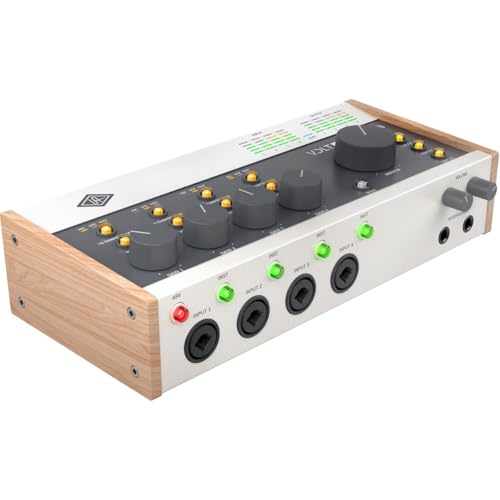
The Universal Audio Volt 476P is a premium USB audio interface designed for musicians and producers who demand professional-quality sound. Created by renowned audio technology company Universal Audio, this interface boasts vintage-inspired preamps and built-in analog compression based on the legendary 1176 compressor. This combination delivers a warm, rich sound ideal for recording vocals, instruments, and mixing tracks to a professional standard.
Key Features & Benefits
- Four studio-grade preamps with phantom power for recording microphones
- Analog compressor modeled after the classic 1176LN for adding punch and presence to your recordings
- Award-winning LUNA Digital Audio Workstation software included, providing a powerful platform for recording, editing, mixing, and mastering
- Dual headphone amplifiers with independent volume controls for clear monitoring during tracking and mixing
- Supports MacOS, Windows, iPad, and iPhone (iOS 14+) for versatile compatibility and portability
- Compact and durable design suitable for home studios and on-the-go recording
Pros & Cons
Pros
- ✓ Exceptional sound quality with vintage warmth and clarity
- ✓ Built-in analog compressor adds professional character to recordings
- ✓ LUNA software is a powerful and intuitive production environment
Cons
- ✗ Limited expandability compared to other interfaces
- ✗ Some users have reported issues with the headphone and monitor outputs
Common Use Cases
- Recording vocals and acoustic instruments for demos or professional releases
- Mixing and mastering tracks to achieve a polished sound
- Live streaming music performances with high-quality audio
Who Should Buy This
Serious musicians, songwriters, producers, and podcasters who want to achieve professional-quality recordings at home. It's ideal for those seeking a dedicated interface with built-in compression and a user-friendly recording workflow.
Not ideal for: Those on a tight budget, as the Universal Audio Volt 476P is a premium product priced at $449.00
Good to Know Before Buying
The Volt 476P is a premium interface and its fixed configuration may not suit everyone's needs. Some users have reported occasional issues with headphone/monitor outputs.
Frequently Asked Questions
What is the difference between the Volt 476P and the standard Volt model?
The main difference is that the 476P has a fixed configuration with four analog preamps, while the standard Volt can be expanded with additional inputs or preamps.
Can I use the Universal Audio Volt 476P on both MacOS and Windows?
Yes, the interface supports both operating systems.
How do I troubleshoot issues with the headphone and monitor outputs?
Check the user manual or online resources for troubleshooting guides. If the issue persists, contact Universal Audio support for assistance.
Prices change frequently. See the latest deal on Amazon.
Check Price on Amazon ↗Related Products
- 1 Spot Pro Cs7 Guitar Pedal Power Supply With 7 Isolated Outputs 9V 12V 18V Stud
- 61 Key Portable Electronic Keyboard Piano Wlighted Full Size Keys Lcd Headphones
- 88 Key Digital Piano Semi Weighted Electronic Keyboard Piano With Music Stand Po
- 88 Key Piano Keyboard Electric Digital Piano With Semi Weighted Keys Keyboard Pi
- 88 Key Piano Keyboard Semi Weighted Electronic Digital Piano With Music Stand Po